
Lynix: AI Photo & Video Maker
DQL TechLabArt & Design
3.479.00 Reviews
- Version
- 4.2.0
- Installs
- 5.00M
- Age Rating
- Everyone
Screenshots





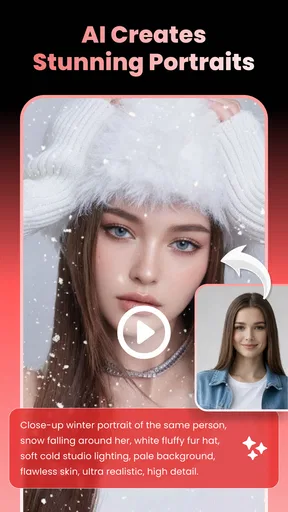

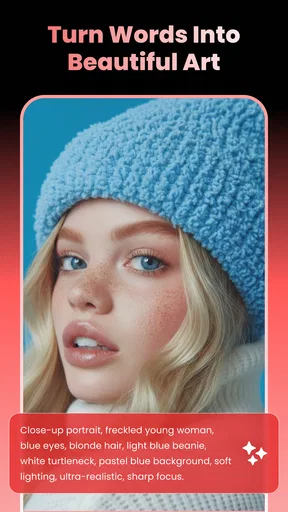
Our Review of Lynix: AI Photo & Video Maker
 Analysis by Appyee
I spent time with Lynix: AI Photo & Video Maker as an art and design app, focusing on the practical question most people have: is it useful enough to keep around when you want a polished AI image or short video without building everything manually? My answer is mixed but fairly clear. Lynix is easy to approach, especially if you want a quick visual result from a template, yet its value depends heavily on how often you create and how comfortable you are with paid extras.
The app comes from DQL TechLab and is free to install. It is rated for Everyone, runs on Android 8.0 and later, and the current version is 3.4.0. Its public reach is already substantial, with more than a million installs, although its average rating sits at 3.4 from roughly 2,200 ratings. That combination tells me to treat it as an accessible experiment rather than an automatic replacement for a full creative suite.
How Lynix fits into everyday AI creation
Lynix is built around the idea of turning a starting image or creative prompt into a more stylized visual through AI templates. In practical terms, I see it as a shortcut for people who want something shareable without opening a complex editor, arranging layers, choosing transitions, and fine-tuning every visual decision themselves.
That shortcut is its main appeal. A template-led workflow gives you a direction before you begin, which is useful when you have a photo but no clear idea what to do with it. Instead of facing a blank canvas, you can choose a visual treatment and judge whether the result is close to the mood you want. This makes the app more approachable than traditional design software, particularly for casual social posts, profile images, invitations, mood boards, and quick personal projects.
I would not describe it as a replacement for a professional photo editor or a timeline-based video application. Those tools are better when exact cropping, typography, color control, audio timing, masking, or repeatable brand layouts matter. Lynix is more about speed and presentation than precise authorship. It helps you reach a finished-looking result quickly, but the template is also shaping much of the creative outcome.
The short store description is simply “Lynix,” while the longer positioning points toward AI photos and videos made through templates. That distinction matters because the app’s identity is not based on a large manual toolkit. If you are looking for a traditional drawing app with brushes, a full layer system, or detailed retouching controls, you may feel that the experience is pointed in the wrong direction from the beginning.
The free starting point and the paid boundary
The app itself is free, so you can install it and decide whether its workflow suits you before spending anything. That is the most important cost fact for a new user: there is no need to commit simply to test the basic experience. At the same time, Lynix includes in-app purchases ranging from $6.99 to $79.99 per item. Those are wide-ranging price points, so I would avoid assuming that every useful template or creation path is included in free access.
This makes the value question more personal than the word “free” suggests. Someone who opens Lynix occasionally for a playful image may get enough from the no-cost entry point. Someone who wants regular access to premium-looking treatments could face a very different decision once paid items become part of the workflow. The sensible approach is to use the free portion first, identify what you can actually create without paying, and only then decide whether a purchase matches your habits.
I also would not judge the app by the highest listed purchase alone. A large top-end price does not automatically mean you will need it, and a low-end purchase does not automatically make the app good value. What matters is whether the specific style or workflow you want is available at a price you consider reasonable. Since the purchase range is broad, check the exact item shown inside the app before confirming anything.
For families, the Everyone rating makes Lynix broadly approachable from an age-classification perspective. That does not mean every generated result will match every personal preference, so I would still preview creations before sharing them publicly, especially when a child is using the device or when the image represents someone else.
What the app is good at in real use
The strongest use case is the “I need a visual now” situation. Imagine taking a portrait on your phone before meeting friends, then wanting a more dramatic version for a social post. A template-based AI app can be more convenient than manually adjusting exposure, contrast, background treatment, and motion effects across several separate tools. Lynix makes sense when the goal is a finished impression rather than a technically exact edit.
It is also useful for people who are visually undecided. I often find that the hardest part of making a graphic is not pressing the buttons; it is choosing a direction. Templates solve that creative hesitation by presenting a recognizable style. Even when the first result is not right, it can reveal what you actually want: a cleaner portrait, a more energetic video feel, or something less heavily processed.
A less obvious benefit is its potential as a concept generator. I would use a few template results as visual references before making a final design elsewhere. For example, a small business owner could explore different moods for a product announcement, then recreate the strongest idea in a more controllable editor. In that role, Lynix is valuable even when it is not the final production tool.
Another practical workflow is preparing several variations from the same source image. Rather than repeatedly editing a photo from scratch, you can compare different AI-driven treatments and choose the one that communicates best. The trade-off is consistency: a template may produce a striking single image but be less suitable when every post must follow strict visual rules.
Where the shortcut becomes a limitation
AI templates can make an image feel finished quickly, but they also reduce control. If the output changes a face, distorts small details, or interprets the source in a way you did not intend, a template-first workflow may leave you with fewer ways to correct the problem than a conventional editor would. That is not necessarily a flaw for playful experimentation, but it matters for portraits, product images, school work, and anything where accuracy is important.
I would be cautious about using a generated result as the only version of an important image. Keep the original photo and treat the AI result as a variation. This simple habit protects you from the most frustrating part of automated editing: getting an attractive result that is difficult to revise because the app has already made several creative decisions for you.
Video creation brings another trade-off. A quick AI treatment can be appealing for a short post, but people who care about exact duration, clip order, captions, sound placement, or detailed transitions will probably prefer a dedicated video editor. Lynix may help with inspiration or fast output, while a conventional editor remains the better choice for a deliberate sequence.
The rating of 3.4 is worth keeping in mind. It is not proof that the app will disappoint you, but it is a useful signal that the experience may not be equally satisfying for everyone. I would pay attention to how reliably the app handles your own images and whether the available templates fit your taste, rather than assuming that the install count guarantees a smooth personal experience.
Small workflow choices that improve the results
Start with a clean, well-lit source image instead of expecting the AI to rescue a blurry or heavily compressed photo. This is especially important for portraits, where the app has less reliable visual information to interpret when the face is dark, partially hidden, or surrounded by clutter. A better source usually gives you a fairer test of the template itself.
Do not judge a template from one attempt. Try it with a second image that has a different composition. Some styles look impressive on a centered portrait but feel awkward on a wide group photo. This comparison helps separate a genuinely useful template from one that only works in a narrow situation.
For social content, make the decision based on the final viewing context. A highly detailed effect may look good full-screen but become muddy in a small feed preview. I would compare the result at the size where people will actually see it, not only while zoomed in on the phone. That is a practical way to avoid mistaking complexity for quality.
When testing paid content, write down what you are buying before you confirm. Is it a style you will use repeatedly, or is it just attractive because it is new? With purchases spanning from $6.99 to $79.99 per item, the difference between a recurring creative tool and a one-time novelty becomes important. The free access is ideal for discovering that distinction before spending.
Finally, save your preferred original files outside the app. I consider this good practice for any AI creation workflow. It gives you flexibility to try a different editor later, compare versions, or return to the unedited source if Lynix produces an effect that looks exciting at first but does not work for the final purpose.
Who is most likely to get real value
Lynix is a good fit for casual creators who want a fast visual transformation and do not want to learn a complicated interface. It is also appealing to social users who post occasionally, students making informal visual projects, and anyone who enjoys trying different AI styles without treating every image as a professional commission.
I can also see value for a creator who uses the app as an idea laboratory. If you regularly need fresh concepts for posts, personal projects, or visual themes, the template approach can help you move past a blank page. The best results may then be refined in another application, but Lynix can shorten the early exploration stage.
People who create frequently should look more carefully at the paid side. Free installation is helpful, but frequent use can make individual purchases more significant over time. Before committing, decide whether you need occasional inspiration or dependable access to a particular collection of styles. The answer changes whether Lynix feels economical or merely convenient.
I would skip it if your priority is pixel-level control, professional retouching, advanced illustration, or carefully edited video. A manual editor is better when you need to preserve exact facial details, maintain a consistent brand identity, or adjust every part of the composition yourself. Lynix is also not the right first choice if you dislike AI-generated variations and want your own decisions to control the entire image.
My recommendation after weighing the trade-offs
My recommendation is to try Lynix as a free creative shortcut, not to treat it as an all-purpose design studio. The app has a clear everyday purpose: helping you turn an ordinary photo or video idea into something more stylized with less manual work. That can be genuinely useful when speed, experimentation, and shareability matter more than exact control.
The cost structure calls for restraint. Because paid items range from $6.99 to $79.99, I would only spend after confirming that the free experience fits your preferred style and that the specific paid option solves a repeated need. The free entry point gives casual users a low-risk way to explore, while frequent creators need to judge paid value against how often they will actually use the results.
For me, the deciding factor is the job. If I need a quick profile variation, a playful post, or a visual starting point for a larger project, Lynix is worth trying. If I need a controlled advertisement, a polished client deliverable, or a video assembled to exact timing, I would choose a more traditional tool instead.
In short, Lynix earns a place as an accessible Art & Design app for fast AI experimentation, but not as a universal replacement for established creative software. Try the free workflow first, keep your originals, and pay only when a specific purchase repeatedly saves you meaningful time. That approach gives the app a fair chance while keeping its convenience in proportion to its limitations.
Privacy and Permissions
See what permissions an app requests and how it handles your data.
- Photos/Media/Files
- read the contents of your USB storage, modify or delete the contents of your USB storage
- Storage
- read the contents of your USB storage, modify or delete the contents of your USB storage
- Wi-Fi connection information
- view Wi-Fi connections
- Other
- view network connections, full network access, control vibration, prevent device from sleeping, Google Play license check
Verdict
Strengths of Lynix: AI Photo & Video Maker
- Quickly creates polished photo and video edits from simple prompts.
- Offers creative AI effects for social posts, stories, and short videos.
- Useful templates help speed up content creation for beginners.
- Can turn ordinary images into stylized artwork with minimal effort.
- Convenient for experimenting with multiple visual ideas in one app.
Limitations of Lynix: AI Photo & Video Maker
- AI results can vary noticeably depending on the quality of the source image.
- Some advanced effects or exports may require a paid subscription.
- Generated videos may occasionally include visual glitches or awkward motion.
- Processing larger projects can take time and may use considerable battery.
- Privacy-conscious users may hesitate to upload personal photos for AI processing.
Other Releases by DQL TechLab
View All
Nexus - AI Video Generator
Art & Design3.7
Similar Picks in This Category
View All
Canva: AI Photo & Video Editor
Canva4.8

PENUP – Drawing-sharing SNS
Samsung Electronics Co., Ltd.4.5

Crafto
Kutumb App4.6

Sketchbook
Sketchbook4.1

ibis Paint X
ibis inc.4.5

Adobe Express: AI Photo, Video
Adobe4.6
Frequently Asked Questions
What is Lynix: AI Photo & Video Maker used for?
Lynix: AI Photo & Video Maker is designed for creating and editing visual content with artificial intelligence. It can help users transform photos, generate creative images, apply artistic effects, and produce short video content from existing media. The app is aimed at people who want quick, social-media-ready results without needing advanced editing skills or complicated desktop software.
Is Lynix: AI Photo & Video Maker free to download and use?
The app may be available to download at no initial cost, but some features, effects, templates, exports, or AI generations can require in-app purchases or a subscription. Before starting a trial, check the pricing page carefully, including the renewal terms and cancellation instructions. Availability of free credits and premium tools may also vary according to the platform, region, and current app version.
Do I need an internet connection to use Lynix?
An internet connection is generally required for the app’s AI-powered functions because images and videos may need to be processed through online servers. Basic actions such as selecting files or viewing content already saved on your device may work offline, but generation, cloud processing, template downloads, and some exports can be unavailable without a stable connection. Mobile data usage may also be significant when handling videos.
Are my photos and videos safe when I use Lynix?
Before uploading personal photos or videos, review Lynix’s privacy policy and the permissions requested by the app. AI editing services may process media on remote servers, and the way files are stored, retained, or deleted can differ from one provider to another. Avoid uploading sensitive documents or private images unless you understand the service’s data practices and are comfortable with its terms.
What devices and files are compatible with Lynix: AI Photo & Video Maker?
Compatibility depends on the operating system, device hardware, and the current version of Lynix. Newer phones and tablets usually provide a smoother experience, especially when generating videos or applying demanding effects. The app may request access to your photo library, camera, or microphone for certain tools. Supported image and video formats, maximum file sizes, export quality, and available features should be checked in the store listing before downloading.
